
Show attachment links in a callout
After hearing users complain about not knowing how many or which attachments are attached to a list item.
I’ve came up with a simple solution for this inconvinience, by using JSLink on the attachment column and create a callout to list the attachment(s) and allowing users to open them.
The following code block will override the default attachment column template.
// Field template for attachments field
// to create a callout with the attachments of a listitem

(function () {
    var overrideCtx = {};

    overrideCtx.Templates = {};
    overrideCtx.Templates.Fields = {
        "Attachments": {
            "View": AttachmentsViewTemplate
        }
    };
    SPClientTemplates.TemplateManager.RegisterTemplateOverrides(overrideCtx);
})();

// Create view template for the attachments field
function AttachmentsViewTemplate(ctx) {
    var attachments = ctx.CurrentItem[ctx.CurrentFieldSchema.Name];
    if (attachments == 0)
        return '';

    var itemId = ctx.CurrentItem.ID;
    var listTitle = ctx.ListTitle;
    // Create a new element and set the id to ensure we can register the callout on it
    var span = document.createElement('span');
    span.setAttribute('id', 'attachmentsButton' + itemId);
    var img = document.createElement('img');
    img.setAttribute('src', '/_layouts/15/images/attach16.png?rev=23');
    img.setAttribute('style', 'width: 16px; height: 16px; border: 0; cursor: pointer;');
    span.appendChild(img);

    CreateAttachmentCallout(itemId, listTitle);

    return span.outerHTML;
}
In the CreateAttachmentCallout method the logic is written to get the list item attachments and create the callout.
// Create the callout registration for the given item
function CreateAttachmentCallout(itemId, listTitle) {

    var queryUrl = ctx.HttpRoot + "/_api/web/lists/getbytitle('" + listTitle + "')/items(" + itemId + ")/AttachmentFiles";

    EnsureScriptFunc("callout.js", "Callout", function () {
        $.ajax({
            url: queryUrl,
            accepts: {
                json: "application/json;odata=verbose"
            },
            method: "GET",
            headers: { "Accept": "application/json; odata=verbose" },
            success: function (data) {
                if (data) {
                    var attachments = "";
                    $.each(data.d.results, function () {
                        attachments += '<li><a href="' + this.ServerRelativeUrl + '" target="_blank">' + this.FileName + '</a></li>';
                    });
                    // create the callout
                    var targetElement = document.getElementById('attachmentsButton' + itemId);
                    var callout = CalloutManager.getFromLaunchPointIfExists(targetElement);
                    if (callout == null) {
                        var calloutOptions = new CalloutOptions();
                        calloutOptions.ID = 'notificationcallout';
                        calloutOptions.launchPoint = targetElement;
                        calloutOptions.beakOrientation = 'leftRight';
                        calloutOptions.title = 'Attachment(s)';
                        calloutOptions.content = '<ul>' + attachments + '</ul>';
                        var callout = CalloutManager.createNewIfNecessary(calloutOptions);
                    }
                }
            },
            error: onQueryError
        });
    });
}
function onQueryError() {
    _notifyId = SP.UI.Notify.addNotification("The attachment buttons could not be created, please reload the page or contact the administrator.", false);
}
Put the both script together into one js file and upload it to the Style Library. Afterwards
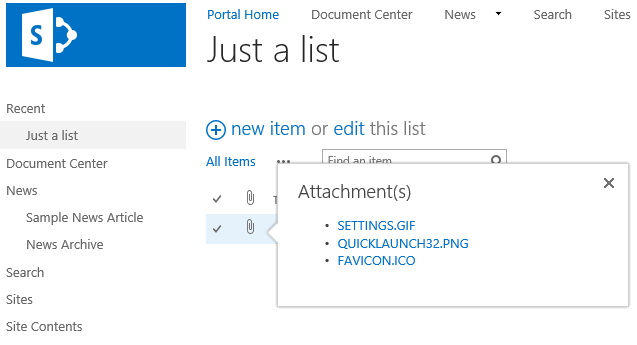
Attachment callout